Pharmaceuticals
Improving Patient Experience: How To Utilise an Interactive Whiteboard in Hospitals
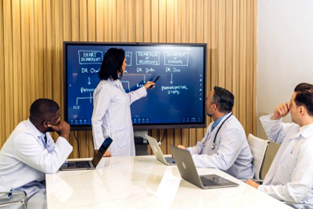
Hospitals and healthcare facilities face a unique set of challenges every day. Patients comprise most of their daily visitors, and no two cases are alike. Yet it’s crucial that medical staff deliver a stellar patient experience for each individual they see.
Of course, long waiting times, confusing information, and other issues can get in the way of this. And when the patient experience suffers, the hospital’s reputation does as well. Bringing in technology such as interactive whiteboards offers a practical solution, and they’re easier to manage than ever.
How Patient Experience Affects Your Bottom Line
Even in facilities featuring top doctors and services, patients will walk out after just one negative interaction. This might include missed or cancelled appointments, faulty or inaccurate diagnoses, and surly customer service staff. Notice the one thing common with these examples? Often, a negative patient experience comes from a problem with communication—or a complete lack of it.
By nature, the medical practice is busy, and miscommunication can be hard to avoid. But it only takes one highly publicised negative experience to undermine a healthcare company’s reputation. Once word spreads about long wait times, cancelled appointments, unresponsive staff, and misunderstood diagnoses, your bottom line starts sinking.
So, how do healthcare organisations improve their communication systems and deliver a better patient experience? Usually, a communication problem requires a communication solution.
Use Technology To Improve Communication and the Patient Experience
To improve communication between your medical professionals and their patients, don’t reinvent the wheel. There are plenty of existing technologies that help bridge communication gaps and increase engagement levels.
For instance, use monitors to post regular updates in the waiting room and let patients know how long they’ll have to wait. Displaying the order in which patients are being treated offers transparency about how long doctors typically meet with their patients. This way, those in the waiting room know what to expect in terms of when they might be seen.
You can also lean on presentations or videos to help patients better understand their diagnosis and treatment plans. This can free up the doctor’s time and give patients another way to process information.
Among the more popular and easy-to-implement ways to improve communication are interactive whiteboards. Through touchscreen technology, these smart devices help make information more accessible for both patients and medical teams.
4 Ways To Use Interactive Whiteboards for Better Patient Experience
Why digital interactive whiteboards? Previous versions such as dry-erase boards and chalkboards were messy prototypes that relied solely on human handwriting. It takes time to write everything on the board. Plus, chalk and markers are both health and environmental hazards. (Besides, doctors have notoriously bad handwriting.)
Interactive whiteboards are a modern way to communicate with patients. You can use your fingers to write on these devices, and many programs will automatically transform handwriting into readable text. Even better, whiteboards can also serve as digital displays that play presentations, slideshows, videos, and images.
If you need to clarify a point, medical staff can annotate the whiteboard’s content directly. Finally, anything displayed on the interactive whiteboard can be saved into a file and printed. This allows both doctors and patients to keep records of their interactions for future reference.
Let’s review some of the other ways interactive whiteboards can improve the patient experience.
Hospital Branding
An interactive whiteboard in the registration area, waiting rooms, consultation areas, and patient rooms signals a healthcare facility’s commitment to communication. Waiting patients can quickly get updates about the current queue lines and estimated waiting times. In between, staff can display hospital information that can help raise brand awareness.
Whiteboards can also play interactive presentations that share the company’s mission, vision, and goals. Then, patients who want to know more can simply interact with the whiteboard to get additional information.
Personalized Care Planning
During consultations, healthcare professionals can easily share their initial findings and discuss the information with patients. Doctors can also use the interactive whiteboard to gather specific information from patients in order to come up with a more accurate diagnosis. Once a treatment is prescribed, patients can turn to the whiteboard to play videos or presentations that help them better understand the treatment process.
Patient Education
Interactive presentations that are catered to individual patients can help educate patients on the nature and treatment of their conditions. By clicking on the presentation via touchscreen controls, they can get more details of how treatment can reverse their condition. Patients can also view simulations of what can happen to them in the absence of treatment.
In addition, patients can use interactive whiteboards to gather more information about their healthcare facility, including its history, specialisations, and public staff data.
(Hospital) Unit-Specific Information
An interactive whiteboard in a hospital room can give doctors and nurses a quick summary of their patient’s current condition. At the same time, they can add changes or instructions so that attending staff can adjust accordingly. Confined patients or their companions can also access information from whiteboards that show updates on administrative matters such as billing, consumption summaries, and timetables.
For the Best Patient Experience, Interactive Whiteboards Need Reliable Device Managers
Interactive whiteboards can improve the patient experience by providing an always-ready communication medium. Because these smart devices are a substantial investment for any healthcare company, be sure to invest in a reliable device management solution to manage, maintain, and secure them.
The right device manager utilises remote cloud technology to provide over-the-air (OTA) updates to all connected devices. It can also control access levels by assigning authority to users based on need. What’s more, a well-designed device manager can secure devices by shutting down units that report unauthorised access.
Device managers can geolocate missing or stolen devices and start the retrieval process. Finally, admins can remotely wipe private data from the devices if there’s a threat of data theft.
As you can see, your choice of device management software can help you get the most out of your interactive whiteboards. Invest in a reliable device manager to maximise their performance for a more efficient medical staff and a better overall patient experience.